Every side project ends up needing a local MCP
Local Bridge uses AWS to connect remote agents to MCP servers on my Mac, with zero inbound ports on my home router.
There’s a point in a side project when I’ve got a script working and start thinking about what an agent could do with it. So I wrap it in a Model Context Protocol (MCP) server, add it to Claude Desktop, and try it right there on my Mac. It might read something from an Apple app or pull data from the project I’m working on.
Then I pick up my phone and think how handy that same tool would be with agents like ChatGPT dots and Claude Duet. But dots (or Claude Duet) can't access desktop-based MCPs and my prototype is still behind the router...
So, I built Local Bridge so I could use a prototype from a compatible remote client before I knew whether it deserved its own cloud deployment. I choose which servers and tools to share. Writes start off, and I stay in charge of what goes back out. The code for this is on GitHub or you can try it yourself with my backend (for free).
Why put AWS in the middle?
A remote agent needs an address it can call... so I need something in the cloud. So, I chose AWS because I wanted to run the relay myself and control how clients sign in and how Macs enroll.
The Mac opens a WebSocket out to AWS and keeps it open. The remote client calls the public HTTPS endpoint (authenticated), and AWS sends the call down the socket the Mac already opened. Local Bridge needs zero inbound ports on my router. Whatever the tool returns comes back through that same relay. I can also expose ALL of the tools for the local MCPs and control which the cloud has access to use.
From prototype to remote tool
I use Speediance to program my workouts and look back at what I did. I built a little Node server on my Mac that spoke MCP over standard input and output. One tool, get_workout_history, takes a date range and returns the completed sessions. That’s what I’d reach for with a question like "Analyze my workouts from last week."
Once the server worked at my desk, I put it behind Local Bridge and used it remotely while it was still a Node process on my Mac. This helped me prove out the concept and enabled me to use my phone to ask these questions instead of using Claude Desktop (or ChatGPT). The prototype was successful enough that I ended up turning it into a project of their own, and I moved the work to the cloud (which became RepFed. RepFed).
I followed a similar path with Obsidian.md. I reached my vault through Local Bridge for a while, then moved that work into the Vault project. In both cases I could put a prototype to work and decide where it should live once I knew what I actually used.
Here’s the path for a prototype like that.
- Build a stdio MCP server with one useful read tool. Test the command and arguments locally in Claude Desktop.
- In Local Bridge, use + to import the server, or choose Add Manually… and enter the command and arguments.
- Switch on the tools you want to share, click Save, and copy the connector URL from Connect.
- Add that URL in a remote client that supports custom MCP connectors. Sign in, keep the Mac awake, and ask the client to call the read tool.
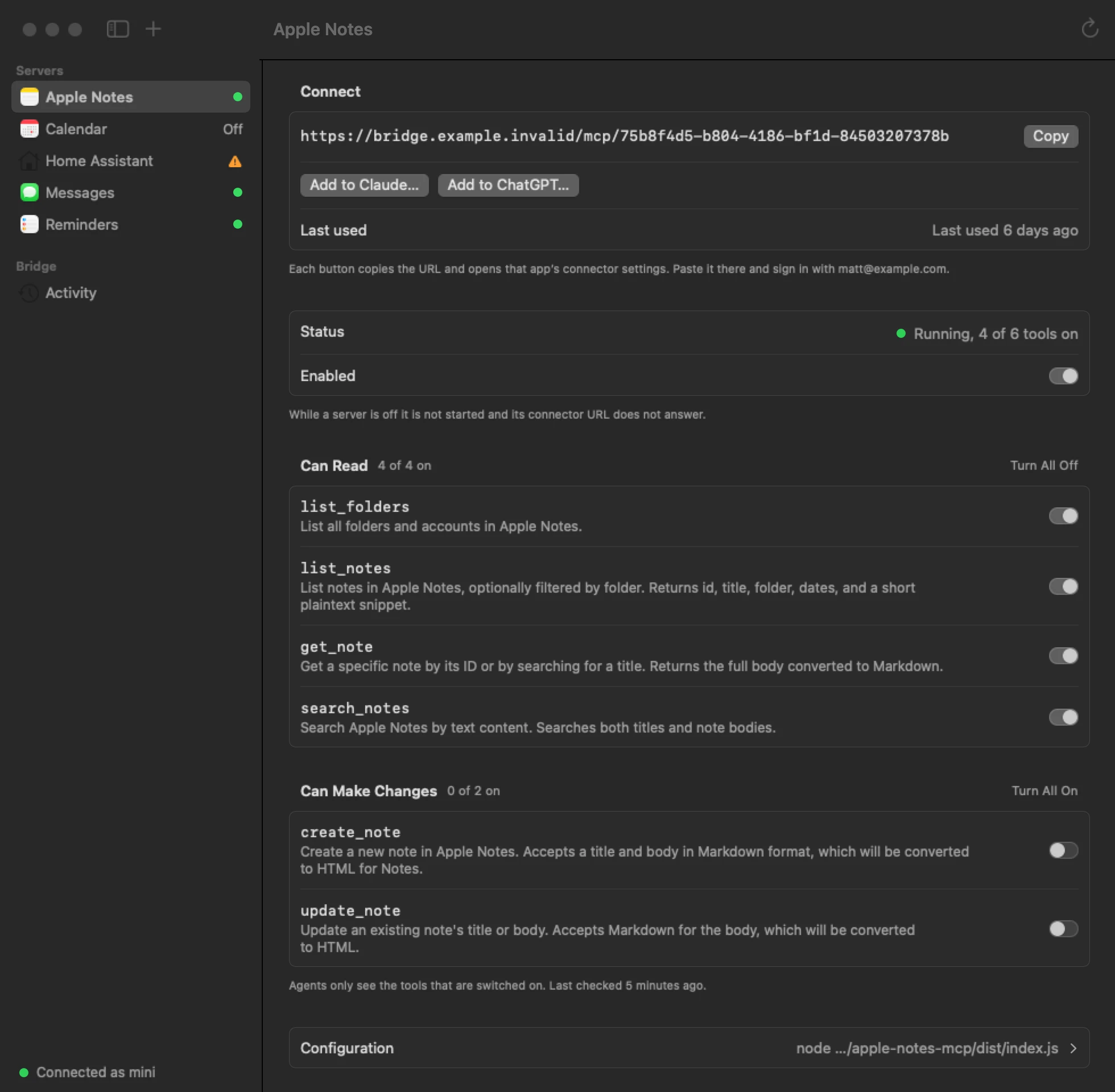
Apple Notes in Local Bridge, rendered with sample data and a demo connector URL. The app has a separate switch for each tool.
Let the Mac make the call
The hosted AWS relay and one complete round trip. The Mac runs the tool in step 5. DynamoDB hands the result from one Lambda invocation to the other in steps 7 and 8.
On the way in, CloudFront routes the connector request to an API Gateway HTTP API. A Lambda checks the client’s credentials, looks up the connector in that account, and saves a pending call in DynamoDB. It uses API Gateway’s PostToConnection to send the call to the Mac.
The daemon acknowledges the call, runs the local MCP tool, and sends the result back on the same socket. The MCP Lambda polls DynamoDB while the client’s HTTP request is still open because the WebSocket Lambda receives the reply in a separate invocation and can’t wake the first one. API Gateway callback docs
The sequence for a single tool call. The call ID is how the two Lambda invocations find each other.
I used a synthetic echo tool to time a full trip through a freshly deployed stack. It came back in about half a second on that run. A real tool adds whatever time the Mac needs to do the work.
What AWS sees and stores
The AWS relay receives whatever the tool returns, whether that’s a note, a reminder, a sensor reading, or a text excerpt. The WebSocket Lambda writes reply fragments and the assembled result to DynamoDB under the call ID so the waiting Lambda can collect it. Both network connections use TLS, and DynamoDB encrypts the table at rest with an AWS-owned key. The Lambdas process the result in plaintext.
After it collects the result, the Lambda deletes the call record and assembled result rows. Reply fragments and leftover call rows are eligible for cleanup after five minutes (although DynamoDB can take a few days to remove expired items). The hosted deployment uses one table for calls, agent permissions, and audit records.
The audit entry has its own 90-day expiry. It keeps who called which tool, when it ran, how long it took, the outcome, byte counts, and a keyed hash of the inputs. The tool response and the original inputs stay out of the audit entry.
The client signs in with OAuth, and the connector UUID identifies the server within the account. During enrollment, the Mac registers an Ed25519 public key and keeps the private key in Keychain. Each WebSocket handshake uses a short-lived signed assertion. AWS ties the socket to the Mac that proved it owns that key.
What I actually switch on
I enable read access one tool at a time. Writes start off, and I turn on a write only when there’s a job I want it to do. A client signed in to my account can use the tools I switch on for that connector, so I look at what each tool can return before I give it access.
But, I also set it up so I can assign different permissions for different agents! Say I want one assistant to add things to my Errands list. I can give it a separate token that allows only create_reminder, and have the bridge fill in Errands as the destination every time. I still have to turn on that write in the Mac app. With just that permission, the assistant can add an errand. It has no access to read the list, edit what’s there, or call tools on my other servers.
Try it or run it on your own AWS account
The self-hosting guide has an echo server you can try with sample data. Ask it to echo “Hello from my Mac,” then swap in one of your own servers using the same steps. Local Bridge is MIT-licensed. To run the relay yourself, deploy the CDK stack in your AWS account and enter its HTTPS and WebSocket addresses in the Mac app before signing in.
For a sense of AWS costs, one Mac connected around the clock for 30 days with a heartbeat every minute comes to about five cents in API Gateway WebSocket charges at US East (N. Virginia) rates. That covers connection minutes and heartbeat messages. Tool calls, Lambda, DynamoDB, logs, and data transfer add to the bill. API Gateway pricing
But what if you don't want to deal with all of that? Managed services are great, right? If you just want to try it, skip the AWS setup. Download the Mac app and start with the free hosted plan. Plus is there if you want more MCP servers or want to connect another Mac. Get Local Bridge for Mac
A few small jobs I’d try next:
- Try a read-only tool for a device on my home network.
- Read my Apple Notes release checklist and save the results of a release in a separate handoff note.
- Build a read tool that reports which Xcode simulator is running and what failed in the last local test run.
Let me build the tool once, reach it from wherever I’m working, and leave me in charge of what goes back out.
Comments
Reply on martzmakes.com